| Mewmew's Challenge |
|---|
 Each city block has a Mewmew's challenge. Complete the challenges to earn Mewmew's Medals and Observation Data. Mewmew's challenge can be completed through the following ways: · Complete City Commissions · Help or repair Bangboo · Find Mini Cargo Trucks · Obtain HIA Commemorative Coins You can find Mewmew quickly through the Navigation page. |
| Mach 25 |

Welcome to the world of Mach 25! Control movement within the time limit using A and D keys, avoid obstacles, and our only goal is to run faster and farther. Welcome to the world of Mach 25! Control movement within the time limit, and our only goal is to run faster and farther. Welcome to the world of Mach 25! Control movement within the time limit using 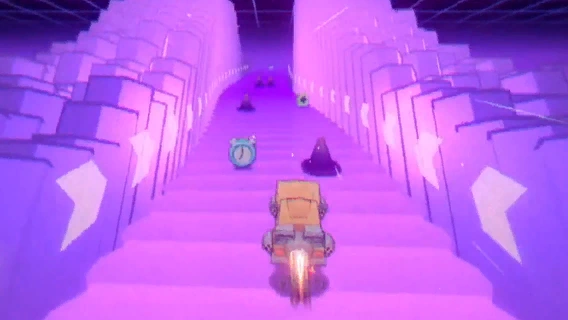 Pay attention to the items in the scene. The time extension item provides more time, and the speed boost item and slowdown item can change your speed level. When you increase your speed level three times, you will enter a brief invincibility period. During invincibility, both the speed boost and slowdown items will become ineffective! 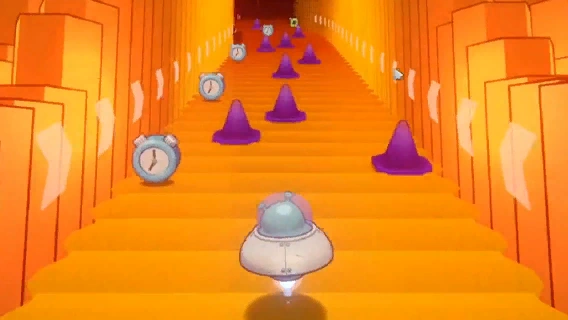 Complete more Achievements Challenges to unlock more characters. Each character has their unique special ability and control style, so choose your favorite Character and drive towards victory! |
| Bardic Needle Music Store |
 The music store allows you to consume a Master Copy to do Tuning and obtain Drive Discs. Drive Discs can be disassembled to obtain Master Copies and partially recover some leveling materials. Leveling the music store will unlock higher-tier Tuning and functions. |
| Waterfall Soup Noodle Shop |
 Eat noodles to gain buffs, lasting for 3 battles. After 1 battle, eat noodles again to change buffs. You can check buff effects at the noodle shop and deployment interface. |
| Workbench |
 The workbench is equipped with various information recording software:
|
| Gadget Store Box Galaxy |
 You can use the relevant materials in the gadget store to buy W-Engines. Equip them to your Agents to enhance their combat performance. You can recycle W-Engines to obtain related materials. |
| Coff Cafe Coffee Shop |
 Proxies can purchase one beverage daily, which when used, will recharge your Battery Charge and grant a buff for better efficiency in obtaining certain materials. |
| Video Archive |
 The Video Archive stores video recordings of important plot events.
|
| Proxy Rank-Up |
 One of the requirements for Inter-Knot Reputation Rank-ups is reaching certain Inter-Knot Levels. You can earn Inter-Knot EXP by:  More content will become available as your Inter-Knot level rises:
|
| Immersive Storytelling |
 Immersive Storytelling Mode is designed for an immersive story experience, and includes the main storyline and other important plot content. Upon entering this mode, the main character's activities will be restricted, and it may limit the acceptance and completion of certain tasks. Choose carefully. You can continue unrestricted when not in this mode. |
| Navigation |
 Using the Travel system, you can quickly travel to your target location. Progressing through the main story will unlock more navigation points. |
| Time System |
 Quickly switch between times:
 A game day is divided into 4 parts: Morning, afternoon, evening, and late night. The street scenes change with each part of the day. For example, some shops are closed at late night. Sometimes, advancing to different parts of the day is necessary to progress in the game. The following actions progress time:
|
| Quick Menu |
 The quick menu bar offers easy access to various customized functions. Press and hold <Action:InLevelInteract> to open Quick Menu. Set up the quick menu bar by navigating to:
|
| Routine Cleanup |
 Completing Routine Cleanup offers the chance to drop Drive Discs and Plating Agents. Each Routine Cleanup has recommended Agent attributes and current intel to improve your chance of success. |
| Combat Simulation |
 Complete Combat Simulations to obtain Dennies, Investigator Logs, W-Engine Power Sources, Plating Agents, Tactical Chips, W-Engine Components, and Certification Seals. Monster slots will gradually unlock as your Inter-Knot level increases. |
| Expert Challenge |
 Completing Expert Challenge offers the chance to drop Higher Dimensional Data and Master Copies. Each Expert Challenge has recommended Agent attributes and current intel to improve your chance of success. |
| Notorious Hunt |
 Complete Notorious Hunts for the chance to drop precious relics, Plating Agents, Master Copies, W-Engine Chips, and Investigation Merits. Investigation Merits can be exchanged for valuable items in Association Supplies. You can earn drop rewards for the first 3 challenges each week. This applies to all Notorious Hunts. No completion rewards will be granted starting from the 4th challenge. Notorious Hunts have weekly "extra incentive" challenges that reset, granting certain rewards upon completion. |
| About Agent Specialties |
 In addition to Stun and Attack, there are other specialties: |
| Stun Specialty and Attack Specialty |
About the Stun specialty: Agents with the Stun specialty excel at quickly accumulating Daze, causing enemies to enter the Stunned state. When in the Stunned state, enemies become unable to act and take additional damage. At this moment, you can switch to an Agent with the Attack specialty to deal damage. About the Attack specialty: Agents with the Attack specialty have strong damage-dealing capabilities and excel at dealing massive damage through direct attacks. When enemies enter the Stunned state, they take additional damage, allowing Attack Agents to perform even more effectively. |
| About Proxies and the HDD System |
 In this unique megacity that coexists with the Hollows, humans inevitably have to interact with them. To avoid getting lost in the Hollows, there are both official legal channels and illegal guides — known as Proxies.  Phaethon's HDD System (Hollow Deep Dive System) is a reliable intelligent tool capable of overcoming the challenge of real-time communication both inside and outside the Hollows. With the HDD System, project your consciousness into the Bangboo Eous and embark on the work of a Proxy! |
| About "Array Mode" |
 Array Mode contains Story Commissions in the form of a Monitor Array for exploration, with the Prologue through Chapter 3 gradually unlocking as the Proxy progresses through the Main Story.
While completing "Array Mode" Commissions, you can also obtain Observation Data and other rewards from within the Hollow. |
| [Tutorial] Logbook Guide |
File:Tutorial (Tutorial) Logbook Guide 1.gif The Logbook Guide can be found in the sidebar
|
| Soul Hounds III |
 Use your Soul Hound to dig soul blocks and advance towards the bottom of the abyss! Controls: Use directional buttons to move the Soul Hound and change its direction.  Press Attack to dig Soul Blocks and go deeper.  Press Jump to jump on a Soul Block.  Collect Pomegranates to maintain your energy level. You will lose HP if your Energy drops too low. |
| Soul Hounds III - Group Hunt |
 Dig down alongside three other Soul Hounds in a race! The Soul Hound that reaches 150 meters deep first wins! Soul Hounds have an unlimited amount of Health. Energy is lost at a faster rate. Soul Hounds and Soul Blocks fall faster. |
| Snake Duel |
 Enjoy a thrilling showdown in Snake Duel! Use the directional buttons to change direction and collect Beans to make your snake longer. Be careful not to hit the walls!  Press Speed Up to make your snake move faster. Enemies will try to snatch your Beans. Get rid of them! Use your snake to surround their heads, but be careful not to get trapped by enemies.  Try your best to get a high score. Collecting Beans and items, as well as defeating opponents, will increase your score. |
| Snake Duel - Clash |
 Enjoy the thrill of this 60-second team-based game! You will be fighting alongside your teammate against two opponents. Your snake revives in 5s after being defeated. Holding down the Speed Up button will cause your snake to reduce in length. At the end of each game, the side with the longer total snake length wins. |
| Bizarre Brigade |
 Survive the relentless onslaught of Nightmares to fend off a certain number of their attack waves. Companions will assist in defending against the monsters and will not take damage.  During the rest phase, you can recruit companions and purchase items with buff effects. Before starting the game, you need to choose a Protagonist. Different Protagonists have their own unlock conditions. Protagonists will have their ATK, Health, and other attributes permanently increased based on the number of candies. Defeated stage bosses may drop candies. Clearing difficulty 5 with each Protagonist increases the candy limit for all Protagonists. |
| Bizarre Brigade: Shared Dream |
 In this fantastic dreamscape, survive with your teammates until wave 15! Enter the game and play as your chosen Protagonist. You will Work together to withstand a certain number of waves of nightmare attacks. When you or your teammate pick up coins, the other player will receive the same number of coins. During the rest phase, you can use these coins to recruit Companions and buy buffs. When making purchases, each of you will spend your own coins separately. Companion bonds are shared between both players, but relics only apply to your own Faction. |
| Trust Events |
 Exploring the city at various times might result in chance encounters with Agents, triggering Trust events. Choosing different dialogue options will affect your Trust level with the Agents.  Appropriate responses will increase trust. In some recurring events, inappropriate responses will decrease trust. |
| Agent Invites |
 You can invite Agents daily through the contacts interface. Completing Agent invitations will significantly increase Trust levels. |
| Pausing an Agent Story |
 Certain functions may be disabled during Agent Stories. If needed, you can leave at any time by selecting Pause Story in the top-left. After leaving, your current progress will be saved, but you won't be able to start any new Agent Stories. |
| Pause Special Episode |
 Certain functions may be disabled during Special Episodes. If needed, you can leave at any time by selecting Pause Story in the top-left. After leaving, your current progress will be saved, but you won't be able to start any new Special Episodes.  While a Special Episode is Paused, you can act freely. If needed, you can use the following methods to return to the Special Episode and continue:
|
| Free Advancement Time |
 In the time system, you can adjust to any time period.
|
| Switch Character |
 You can choose to switch control to a different character from the list. You can control an Agent after acquiring them.
|
| Agent Story Re-play |
 After completing an Agent Story, you can still play the completed commissions again.
|
| Training Target Details |
 After setting an Agent as the Training Target, a special mark will appear in the HIA Club, Routine Cleanup, Notorious Hunt, music store, Compendium, and other interfaces. The Training Target can be canceled or replaced with another Agent at any time. Only one Agent can be set as the Training Target at a time. |
| Ether Tuning |
File:Tutorial Ether Tuning 1.gif
Drag the control points to adjust the curve Drag the control points to adjust the curve Use <Action:UILeftShoulder><Action:UIRightShoulder> to switch between control points File:Tutorial Ether Tuning 2.gif
Guide the sphere on the curve to pass through the numbered Guide the sphere on the curve to pass through the numbered File:Tutorial Ether Tuning 3.gif
Press the following buttons to use their functions:
Press the following buttons to use their functions:
|
| Mission Types and Status |
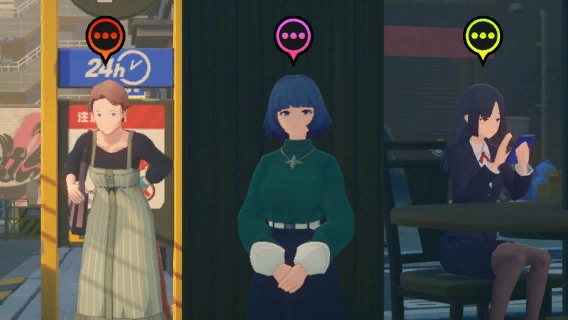 Missions come in different types, distinguished by colors.  Key Missions: Main Story Chapters, Special Episodes, etc. Key Missions: Main Story Chapters, Special Episodes, etc. Agent Missions: Agent Stories, Invitation Missions, Quality Time, etc. Agent Missions: Agent Stories, Invitation Missions, Quality Time, etc. Hearsay Missions: Combat Missions, Exploration Missions, Schedule Missions, etc. Hearsay Missions: Combat Missions, Exploration Missions, Schedule Missions, etc. Event Missions: Limited-Time Events, Ridu Chronicles, etc. Event Missions: Limited-Time Events, Ridu Chronicles, etc. You can distinguish the current mission status by the shape of mission icons. Taking Side Missions as an example: Available to accept; Accepted but not tracked; Accepted but not tracked; Accepted and currently tracking. Accepted and currently tracking. |
| Outfit Preview |
 In the Outfit preview interface, you can interact with the Agent model through rotation, zoom, and vertical camera movement. |


_Logbook_Guide_1.gif)


