zenless zone zero

Options are where one goes to configure various games options, and is accessible from the Main Menu.

Graphics

Setting Options
Image
Display Mode (Resolution) 1280x720, 1600x900, 1920x1080, 2276x1280, 2560x1440, 3840x2160
Windowed/Full-Screen
Image Quality High, Medium, Low, Custom
Custom
FPS 30, 60, Unlimited
Vertical Sync Disable, Enable
Rendering 0.8, 1.0, 1.2
Anti-Aliasing Disable, TAA, SMAA
Global Illumination Low, Medium, High
Shadows Low, Medium, High
FX Quality Very Low, Low, Medium, High
Shading Quality Low, Medium, High
Character Quality Low, High
High-Precision Character Resolution Disable, Dynamic, Global
Environment Quality Low, High
Anisotropic Filtering 1x, 2x, 4x, 8x, 16x
Mirror Reflections Disable, Low, Medium, High
Volumetric Fog Disable, Low, Medium, High
Bloom Disable, Enable
Motion Blur Disable, Enable
Distortion Disable, Enable
Color Filter Strength 0-10

Input

Setting Options
UI Layout Quick Switch Mode Seamless Recognition, Button Switch
Camera Sens (X-axis) 1-5
Camera Sens (Y-axis) 1-5
Inverted Camera (X-axis) Default, Invert
Inverted Camera (Y-axis) Default, Invert
Manual Lock-On Switching Sensitivity 1-10
Automatic Camera Rotation Off, On
Shortcut Wheel Settings [Click to Select]
Board Camera Sensitivity 1-5

Mouse & Keyboard

Allows the player to change the various keybinds, or change controller layout. See the Controls page for more details.

Sound

Setting Options
Main Volume 0-10
Music Volume 0-10
Dialog Volume 0-10
SFX Volume 0-10
Ambience Noise Volume 0-10
Playback Device Headphones, Speaker, TV
Mute While in Background Disable, Enable

Language

Setting Options
Game Language 简体中文 (Chinese Simplified), 繁體中文 (Chinese Traditional), English, 한국어 (Korean), 日本語 (Japanese), Español (Spanish), Русский (Russian), ภาษาไทย (Thai), Tiếng Việt (Vietnamese), Bahasa Indonesia (Indonesian), Français (French), Deutsch (German), Português (Portuguese [Brazil])
Voice Language Chinese, English, Japanese, Korean
Keyboard Layout General Keyboard, French Keyboard, German Keyboard

Account

Setting Options
USER CENTER View Here (opens https://account.hoyoverse.com/)
Privacy Policy View Here (opens https://zenless.hoyoverse.com/en-us/company/privacy)

Other

Setting Options
Show Combat DMG Disable, Default Effect, Damage Compilation
Chain Attack Mode Auto Mode, Manual Mode
Run in City Hold, Press
Normal Dialogue [Text Appears Gradually] Disable, Enable
Speed Up Daily Combat End Animation Disable, Enable
Main Story Difficulty Casual Mode, Challenge Mode
Quick Use of Bangboo Plug-Ins on the Board Hold, Press
Remember Board Acceleration Status Disable, Enable
Chessboard Camera Distortion Influence 0-100

Change History

Version 2.5

  • Added a combat Damage Compilation function under Show Combat Damage. During combat, damage numbers will be consolidated based on skill type and attribute.

Version 2.2

  • Adjusts the default corresponding FX Quality settings for Image Quality levels under Options - Graphics in the PC client. For medium and low Image Quality presets, it reduces the corresponding special effects performance to improve frame rates. The specific changes are as follows:
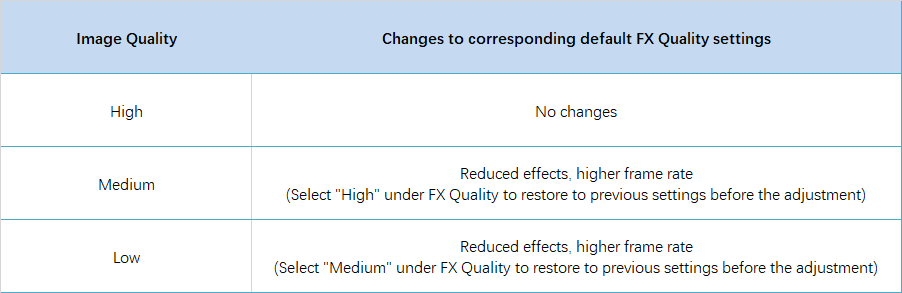
FX Quality Optimization 2.2

Version 0.13

  • Options was released.

Navigation